LightBlog

mercredi 31 mars 2021

The Honor Band 6 brings along a big screen and accurate sleep tracking for a low price

The first thing that caught my attention as I unboxed and set up the Honor Band 6 wasn’t the fitness tracker’s design or build quality. They’re both nice, don’t get me wrong, but it’s nothing I haven’t seen before. Instead, the thing that made me do a double-take is that the Honor Band 6 still requires the app Huawei Health to work.

Honor, as most readers already know, is no longer a part of Huawei; the brand was sold last November as part of an attempt by the Chinese tech giant to keep its consumer business afloat despite mounting sanctions by the US government. So why is it that the Honor Band 6 is still tethered to a Huawei software service?

It turns out, the Honor Band 6 is a “transitional product,” at least that was what a representative from Honor told me. As this band was designed, manufactured, and even launched (in China) before the Honor brand sales were finalized, it remains a Huawei product. Moving forward, the representative told me, Honor products will be self-developed and will use their own ecosystem.

This makes the Band 6 one of the last of its kind — future Honor products will no longer share this Huawei lineage. This alone makes the band sort of notable, but how does it perform?

The Honor Band 6 with a 1.54-inch AMOLED screen

About this review: Honor sent us the Honor Band 6 for review. This review is after using the device for more than a week. Honor had no inputs in the contents of this review.

Honor Band 6: Design

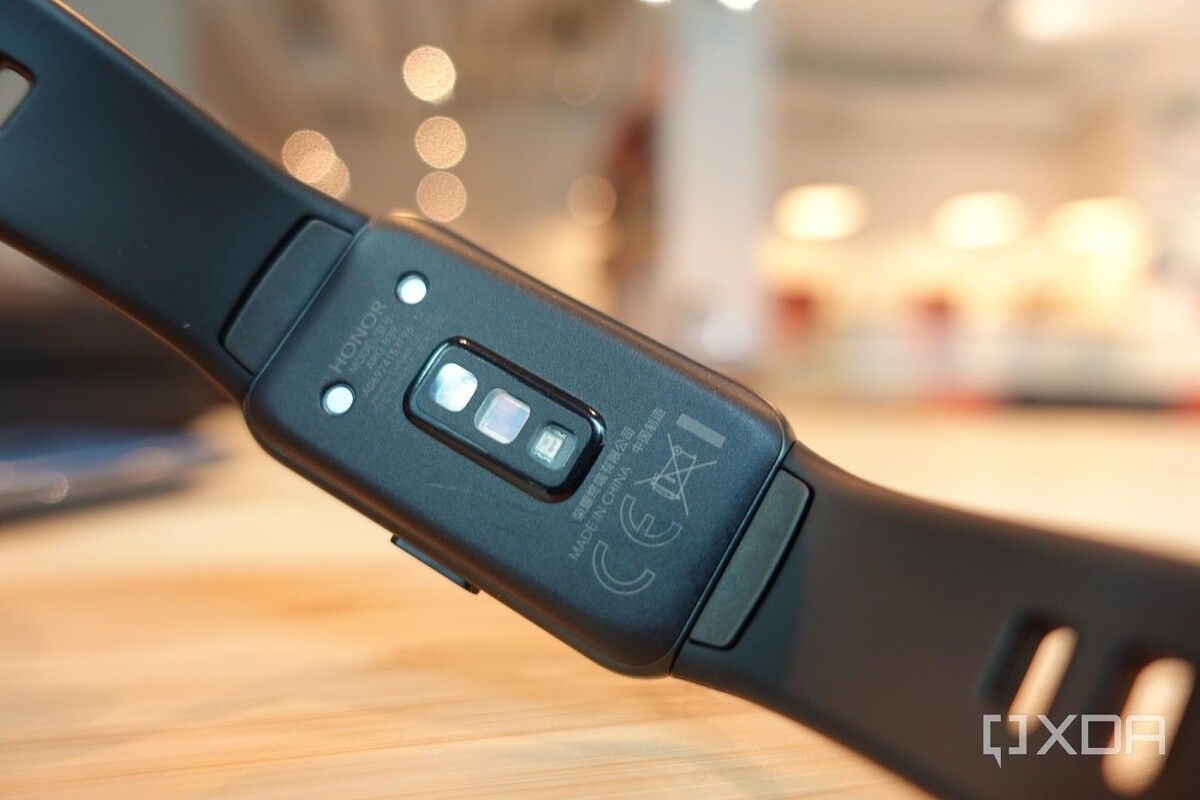
The biggest improvement over the Honor Band 5 from 2019 is an increase in screen size from 0.95″ to 1.45″. This 194 x 368 AMOLED panel is sharp, vibrant, and easily visible even under direct sunlight. The screen fills up roughly 85% of the device’s face, so bezels are relatively slim; there’s a single physical button on the right side, and the left side has Honor’s logo etched onto the plastic frame. The actual tracker measures about half an inch in thickness so it’s thin enough to not get in the way when putting on or taking off long-sleeved shirts and jackets. Around the back is the typical heart rate sensor that can continuously track your heart rate throughout the day.

Honor Band 6 right side Honor Band 6 left side Honor Band 6 back

The band is silicone as is the case with most fitness bands, and the fit is comfortable for me thanks to a higher-than-usual number of notches that are closer together — which allows for more incremental adjustments.
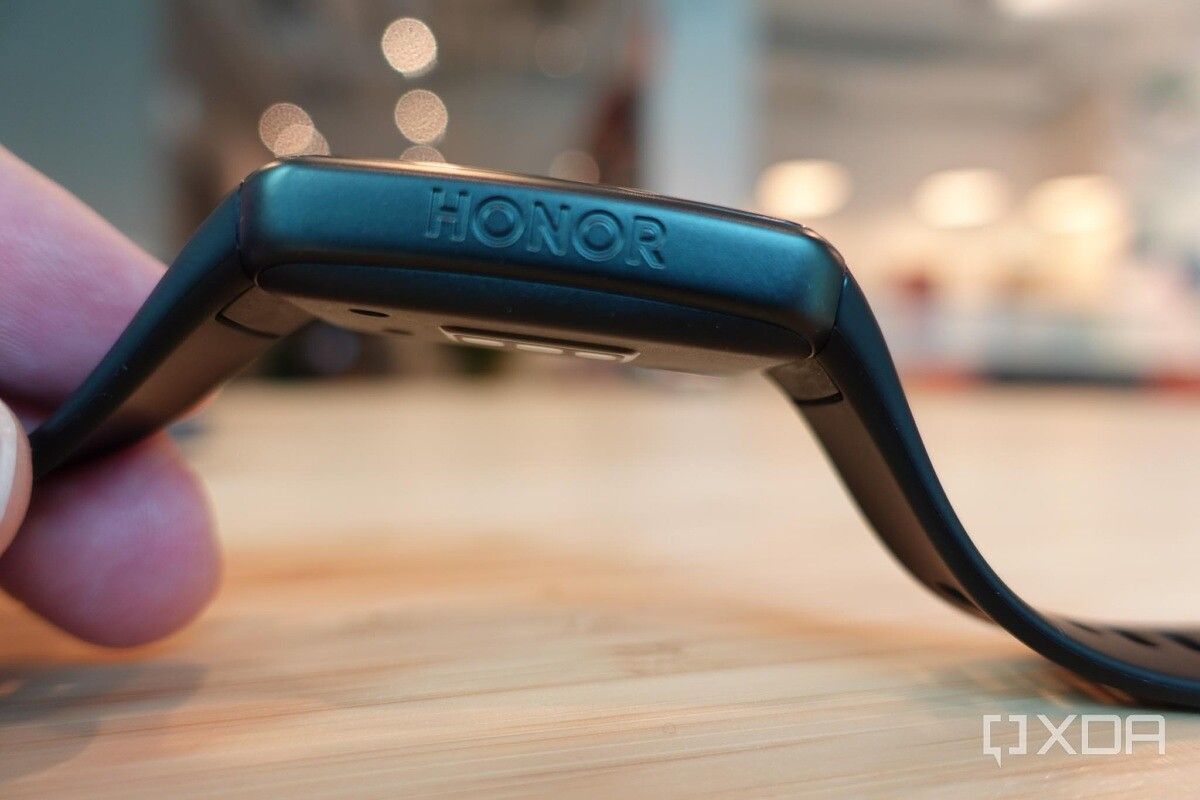
Honor logo on the side of the band. The Honor Band 6 silicone strap

While my band is in an understated black, there are two other color options to add some splashes of color to the aesthetic.

Honor Band 6 Honor Band 6

Software and Features

As mentioned in the beginning of this review, pairing with the Huawei Health app is required to set up the band. I paired the band with a Huawei Mate X2 for the first two days, then switched over to the Vivo X60 Pro Plus, and both worked fine.

The Huawei Health app works well: it has an easy to navigate interface, shows me my crucial data in an easily digestible manner, and it syncs with the band far better than Fitbit’s services (I have used Fitbit products for years, and app pairing has always taken much longer than competitors). For example, if I assign a new watch face in the Huawei Health app — and there are dozens to choose from — the change is shown on the actual band within seconds. On my Fitbit Sense, this action could take 3-5 minutes.

Honor Band 6 watch faces

Notifications came through in real-time, however, these are static notifications, meaning I can just read a couple of lines worth of information. I can’t expand or respond to them. This is the case with most fitness trackers, so I suppose I can’t complain too much, but I’m used to wearing either the Fitbit Sense or Apple Watch 6 and both allow me to respond to WhatsApp or Telegram messages directly on the wrist.

The Honor Band 6 getting a WhatsApp notification Honor Band 6

Honor Band 6: Health Tracking

The Honor Band 6 can track just about all the activities one would expect from a fitness tracker: it can obviously track steps, heart rate, stairs climbed, various exercises including weightlifting and cycling, but it also adds women’s cycle tracking this year. I couldn’t track the latter, but the other metrics were all accurate.

Honor Band 6 tracking workouts

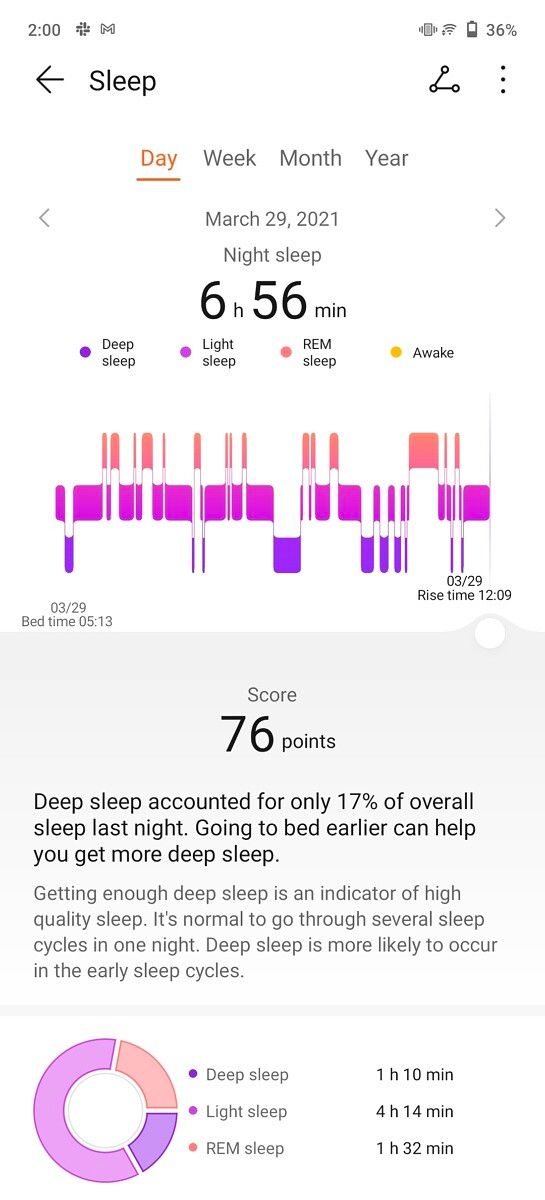
The excellent sleep tracking seen in previous Huawei/Honor devices returns here too. The Honor Band 6 can track my sleep automatically without needing me to manually prompt the device. I tend to toss around in bed a lot during sleep, and less intelligent trackers can sometimes mistake a middle-of-the-night movement as waking up — but the Honor Band 6 passes the test. All the data seems accurate to me, as far as I can tell. The sleep data doesn’t just tell me how long I’ve slept, but how well I slept, including a percentage of time spent in REM, or light sleep, etc.

Honor Band 6 tracking my steps Honor Band 6 tracking my workouts Honor Band 6 tracking my workouts Honor Band 6 tracking my sleep Honor Band 6 tracking my sleep Honor Band 6 tracking my sleep

There’s also an SpO2 sensor for blood-oxygen tracking. I tested it along with an Apple Watch 6 and the results are similar, which should imply they’re accurate.

Honor Band 6: Battery Life

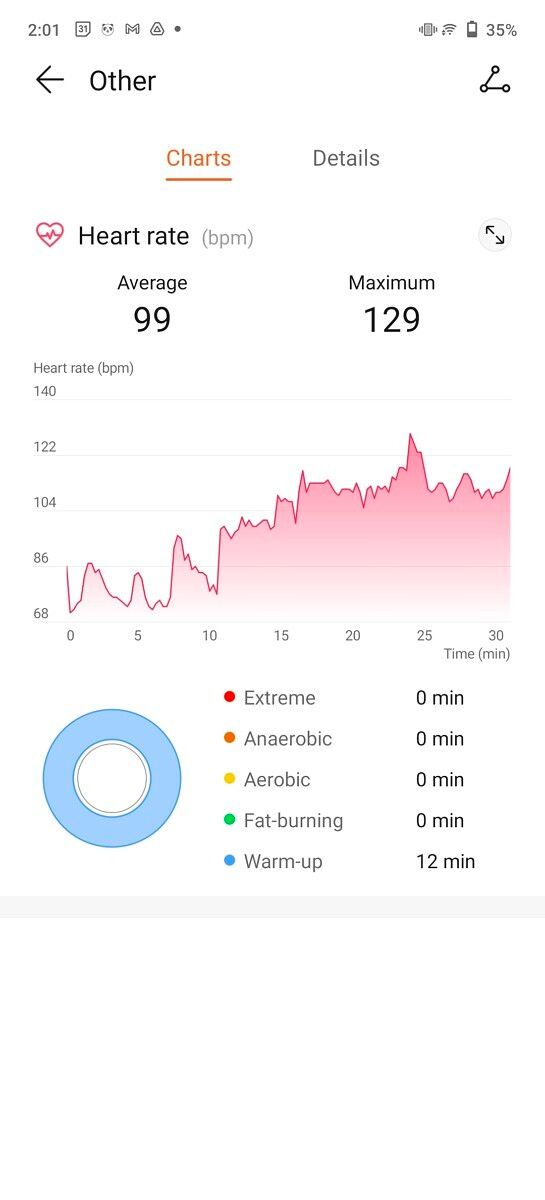
As is usually the case with Huawei/Honor products, battery life is very good. The Band 6 advertises 14-day battery life on a single charge; while I haven’t used the band for that long yet, I can say that after a full week of use, I still see 61% battery left on my band right now — so the band can surely last 14 days, if not 15. Keep in mind, throughout the week I wore the band over 23 hours a day, only taking it off for showers and cooking. The band is rated 5 ATM by the way, so even if I were to wear it in the shower, it would have no issues.

Honor Band 6 tracking heart rate

Pricing and Availability

The Honor Band 6 has a suggested retail price of €50 ($58) but it’s on sale at AliExpress — which is open to US consumers too — at just $36. At this price, I can’t really complain about the Honor Band 6, even if I wish I could interact with notifications.

    The Honor Band 6 is a sleek fitness tracker with a large screen and two-week battery life.

The post The Honor Band 6 brings along a big screen and accurate sleep tracking for a low price appeared first on xda-developers.


from xda-developers https://ift.tt/2Pm0qEG
via IFTTT

Microsoft is shutting down the Cortana app on Android and iOS

The Cortana mobile app for Android and iOS is officially being axed by Microsoft today, March 31, 2021. Originally launched in November 2018, the voice assistant app was removed from the Google Play Store and Apple App Store in January last year. While it was still functional, starting today, Microsoft has confirmed that it will no longer offer support for the app.

As per a support page spotted by 9to5Mac, Microsoft says that reminders and lists will no longer be available to users within the app. however one can still have access to them through Cortana on Windows. Additionally, Cortana reminders, lists, and tasks are automatically synced to the Microsoft To-Do app which is available for both Android and iOS.

As we announced in July, we will soon be ending support for the Cortana app on Android and iOS, as Cortana continues its evolution as a productivity assistant.

As of March 31, 2021, the Cortana content you created–such as reminders and lists–will no longer function in the Cortana mobile app, but can still be accessed through Cortana in Windows. Also, Cortana reminders, lists, and tasks are automatically synced to the Microsoft To Do app, which you can download to your phone for free.  

After March 31, 2021, the Cortana mobile app on your phone will no longer be supported. 

The reason for Microsoft killing the mobile version of the app is due to a change in strategy. Cortana is being integrated within the Microsoft 365 suite of productivity apps and of course, it will continue to serve as the default voice assistant for Windows 10. With the integration of Cortana with Microsoft 365, the company has introduced personalized, actionable briefs in Outlook for Exchange users, and adding Cortana to the Teams mobile app to do things like manage calendars, email, and join meetings. The dedicated mobile app no longer figures into this vision.

The post Microsoft is shutting down the Cortana app on Android and iOS appeared first on xda-developers.


from xda-developers https://ift.tt/3cERWRG
via IFTTT

Stable One UI 3.1 update goes live for the Samsung Galaxy M21 in India

Samsung’s One UI 3.1 update train is running at full steam. Over the past weeks, the company has delivered the One UI 3.1-based update to more than a dozen Galaxy devices, including the Galaxy S10 Lite, Galaxy M51, Galaxy A50, Galaxy A70, Galaxy A80, and more. Having delivered the latest version of One UI to most of its premium flagships and mid-range lineup, the company has now turned its attention towards budget-friendly smartphones. Earlier this month we saw Samsung rolling out the stable One UI 3.1 update to the Galaxy M31 and now the Galaxy M21 is getting the same treatment.

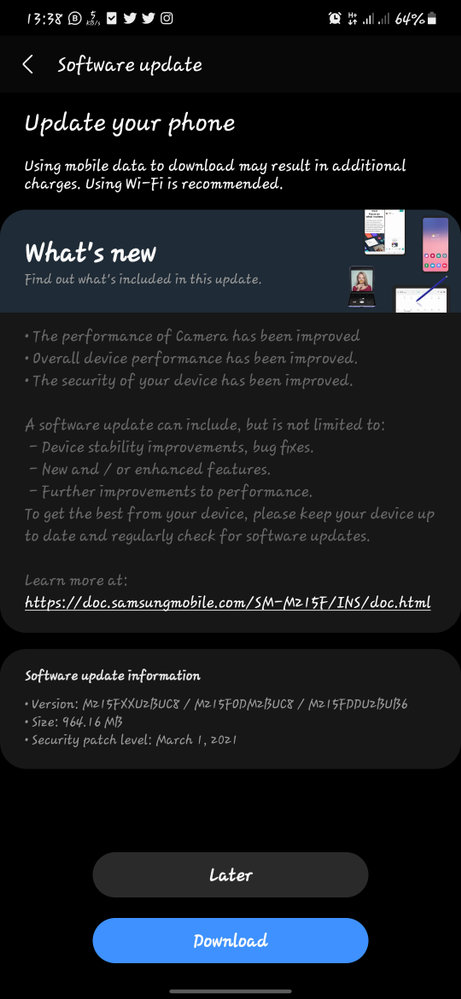
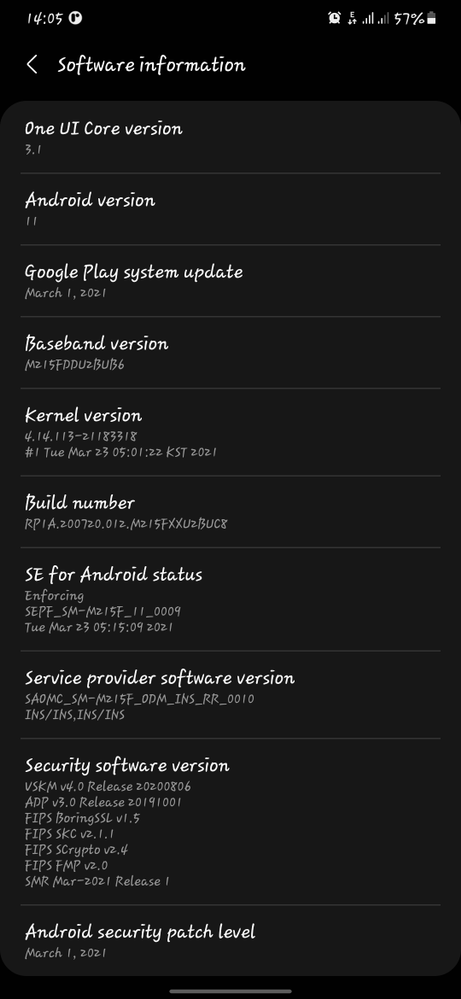
Samsung has begun rolling out the stable One UI 3.1 Core update to the Galaxy M21. Several Galaxy M21 owners in India have confirmed receiving the update. The update carries build number M215FXXU2BUC8 and is 964.16MB in size. Besides bumping the One UI version, the software package also includes March 2021 security patches. There’s no change to the underlying Android version as the Galaxy M21 already received Android 11 via One UI 3.0 update back in January.

One UI 3.1 OTA for Galaxy M21

One UI 3.1 isn’t as massive a jump the way One UI 3.0 was from One UI 2.5. Still, the Galaxy M21 owners can look forward to many useful improvements, including the new Eye comfort shield, updated camera app, new editing tools, and more. To learn more about all the new features and improvements in One UI 3.1, check out our in-depth review.

Galaxy M21 XDA Forums

If you own a Galaxy M21 and reside in India, keep an eye out for the OTA notification. As is usually the case with staged software rollouts, however, it might take several days before the update is rolled out to everyone so don’t worry if you’re not seeing any update notification on your device just yet. You can also manually check for the update by heading to Settings > Software updates. So far, the One UI 3.1 software rollout has only gone live in India, but it’s only a matter of time before we see the new software making its way to other markets.

The post Stable One UI 3.1 update goes live for the Samsung Galaxy M21 in India appeared first on xda-developers.


from xda-developers https://ift.tt/3cD10qj
via IFTTT

Realme GT Neo offers a serious hardware punch at an affordable price

After launching the Realme GT earlier this month, Realme is back again with a new, cheaper model in the lineup. The company has just launched the Realme GT Neo in China. The latest entrant in the company’s GT series offers powerful hardware and unique design at an affordable price point.

Realme GT Neo: Specifications

Specification Realme GT Neo
Dimensions and Weight
  • 158.5mm x 73.33mm x 8.4mm
  • 179g
Display
  • 6.43-inch Super AMOLED
  • 2400 x 1080 (Full HD+)
  • 120Hz screen refresh rate
  • 360Hz touch sampling rate
  • 100% DCI-P3 wide color gamut coverage
SoC
  • MediaTek Dimensity 1200:
    • Octa-core (Up to 2.0GHz)
    • 6nm
  • ARM G77 MC9 GPU
RAM and Storage
  • RAM: 6GB/8GB/12GB
  • Storage: 128GB/256GB
Battery & Charging
  • 4,500 mAh battery
  • 50W fast charging (a 65W charger comes inside the box)
Rear Camera
  • Primary: 64MP Quad Pixel f/1.79
  • Secondary: 8MP f/2.3 ultra-wide angle
  • Tertiary: 2MP f/2.4 macro
Front Camera
  • 16MP f/2.5
Ports
  • USB Type-C port
  • 3.5mm headphone jack
Connectivity
  • 5G
  • NFC
  • Bluetooth 5.1
  • Wi-Fi 6
  • Type-C port
  • WiFi 802.11.b/g/n/ac (2.4GHz + 5GHz)
  • Dual-band GPS
Others
  • In-display fingerprint scanner
  • Dual speakers
  • Dolby Panorama sound effects
  • Hi-Res Audio certification
Software
  • Realme UI 2.0 based on Android 11

The Realme GT Neo sports a 6.43-inch Super AMOLED panel with a 120Hz screen refresh rate and 360Hz touch sampling rate. The phone is powered by MediaTek’s top-tier Dimensity 1200 SoC, paired with either 6GB / 8GB / 12GB RAM and 64GB/128GB UFS 3.1 flash storage. In the camera department, we have a 64MP primary shooter, an 8MP ultra-wide shooter, a 2MP macro lens, and a 16MP front camera.

The 4,500mAh battery of the Realme GT Neo is the same as its Snapdragon 888-powered sibling with support for 50W fast charging (although the company ships a 65W charger inside the box).

Similar to the standard Realme GT, the Neo model also aims to offer a superior gaming performance and comes with stainless steel and copper sheets to keep the thermals in check.

The rest of the highlights include 5G support, NFC, WiFi 6, stereo speakers, dual-band GPS, a 3.5mm audio jack, dual SIM support, and Realme UI 2.0 based on Android 11.

Pricing & Availability

The Realme GT Neo will go on sale in China starting April  7 at a starting price of CNY 1,799 (~$274) for the base model. Meanwhile, the 8GB + 128GB and 12GB + 256GB models are priced CNY 1,899 (~$290) and CNY 2,399 (~$366), respectively. There’s no official word on when, if ever, the phone will make its way to global markets.

The post Realme GT Neo offers a serious hardware punch at an affordable price appeared first on xda-developers.


from xda-developers https://ift.tt/2O7p37m
via IFTTT

mardi 30 mars 2021

GitHub rolls out long-awaited features to its desktop and mobile apps

GitHub is one of the most popular code-hosting platforms in the world, home to millions of software projects and websites. Even though many developers prefer to use the Git command-line application for uploading code and managing projects on GitHub, the company has its own desktop application that can make some tasks easier, and it’s now receiving an important update. The mobile app, which arrived on Android in 2020 and iOS in the year prior, is also gaining some features.

GitHub Desktop v2.7 is now rolling out to Windows and macOS (still no Linux support, sadly) with a long-awaited feature: cherry-picking commits. This allows developers to pick any commits from one branch, including more than one at the same time, and copy them to another branch. There’s also an undo function, as well as the same conflict resolution dialog you get with normal branch merges.

Cherry-picking commits in GitHub Desktop

The desktop application also now displays a warning icon if the email address on the current GitHub account doesn’t match the email in the global Git configuration. This should help prevent commits from being misattributed, which can easily happen with multiple GitHub accounts (or when using Git for both personal and work projects).

Meanwhile, the mobile GitHub apps can now send push notifications when you’re assigned a pull request or task, or when you’ve been requested to approve a deployment for a protected environment. Each notification category can be turned on or off through the app’s settings, and a new option has been added for muting all alerts at certain times or days. The mobile app is also gaining the desktop site’s ability to change how you’re alerted for a repository — you can get an alert for all changes, changes you’re tagged on/participating in, or no alerts at all.

Working Hours feature in GitHub mobile app

Finally, the GitHub app can now view any release from a project, and any files from the release can be downloaded. You probably won’t be able to do much with the files from just a phone or tablet, but it’s still a handy feature for backups or sharing files to another service.

GitHub (Free, Google Play) →

The post GitHub rolls out long-awaited features to its desktop and mobile apps appeared first on xda-developers.


from xda-developers https://ift.tt/3cC9A8L
via IFTTT

ASUS launches the ZenBook 13 OLED and VivoBook range with AMD Ryzen 5000U CPUs in India

ASUS has launched a bunch of new mainstream laptops in India spearheaded by the new ZenBook 13 that features an OLED panel and AMD’s new Ryzen 5000U series processors. With that, ASUS is also refreshing its range of VivoBook laptops with similar processor upgrades. Notably, some of the VivoBooks that ASUS is introducing today are already available with the latest Intel 11th-gen processors.

Specifications ASUS ZenBook 13 OLED VivoBook S S14 VivoBook Ultra K14/K15 VivoBook Flip 14 ASUS VivoBook 15 VivoBook 17
Dimensions & Weight
  • 304 x 203 x 13.9mm
  • 1.1kgs
  • 324.0 x 213.0 x 15.9mm
  • 1.4kgs
  • Ultra K14
    -324 x 213 x 17.3mm
    -1.4kgs
  • Ultra K15
    -359 x 235 x 18.6mm
    -1.8kgs


  • 324 x 220 x 18.2mm
  • 1.5kgs
  • 360.2 x 234.9 x 19.9mm
  • 1.8kgs
  • 406 x 256 x 21.4mm
  • 2.3kgs
Display
  • 13.3-inch Full-HD (1920 x 1080) OLED
  • 100% DCI-P3 color gamut
  • TÜV Rheinland Eye Care certification
  • Pantone validated
  • 400-nits max brightness
  • VESA DisplayHDR 500
  • 14-inch Full-HD (1920 x 1080) IPS
  • 250-nits brightness
  • 14-inch/15.6 Full-HD (1920 x 1080)
  • 250-nits brightness
  • 45% NTSC coverage
  • 14-inch Full-HD (1920 x 1080) touchscreen
  • 45% NTSC coverage
  • 15.6-inch Full-HD (1920 x 1080)
  • 45% NTSC coverage
  • 17.3-inch Full-HD (1920 x 1080)
  • 45% NTSC coverage
Processor
  • AMD Ryzen 7 5700U
  • AMD Ryzen 5 5500U
  • AMD Ryzen 5 5500U
  • AMD Ryzen 7 5700U
  • AMD Ryzen 5 5500U
  • AMD Ryzen 3 5300U
  • AMD Ryzen 5 5500U
  • AMD Ryzen 7 5700U
  • AMD Ryzen 5 5500U
  • AMD Ryzen 5 5500U
GPU
  • AMD Radeon graphics
  • AMD Radeon RX Vega 7
    integrated
  • AMD Radeon integrated graphics
  • AMD Radeon integrated graphics
  • AMD Radeon integrated graphics
  • AMD Radeon integrated graphics
RAM & Storage
  • 16GB LPDDR4X 3733MHz
  • 1TB PCIe 3.0 SSD
  • 8GB DDR4 3200MHz
  • 1TB PCIe 3.0 M.2 SSD
  • Additional PCIe 3.0 M.2
    SSD slot
  • 8GB DDR4 3200MHz
  • Up to 512GB PCIe M.2 SSD
  • Up to 1TB SATA HDD
  • 8GB DDR4 3200MHz
  • 512GB PCIe M.2 SSD
  • 8GB DDR4 3200MHz
  • 512GB PCIe M.2 SSD (up to 1TB)
  • 2.5-inch SATA HDD
  • 16GB DDR4 3200MHz
  • Up to 512GB PCIe M.2 SSD
  • Up to 1TB SATA HDD
Battery & Charger
  • 67Whr battery (16-hours claimed)
  • 50Whr battery
  • 42Wr battery
  • 42Wr battery
  • 37Whr battery
  • 47Wr battery
I/O
  • 2 x USB 3.2 Gen 2 Type -C
    (Display output and PD support)
  • USB 3.2 Gen 1 Type-A
  • HDMI 2.0b
  • microSD card reader
  • USB 3.2 Gen 1 Type-C
  • USB 3.2 Gen 1 Type-A
  • USB 2.0
  • HDMI 1.4
  • 3.5mm combo audio jack
  • SD card reader
  • USB 3.1 Gen1 Type-A
  • USB 3.1 Gen1 Type-C
  • 2 x USB 2.0
  • HDMI 1.4
  • 3.5mm combo audio jack
  • Micro SD Card reader
  • USB 3.2 Gen1 Type-A
  • USB 3.2 Gen 2 Type-C
  • HDMI 1.4
  • 3.5mm combo audio jack
  • Micro SD Card reader
  • USB 3.1 Gen1 Type-A
  • USB 3.1 Gen1 Type-C
  • 2 x USB 2.0
  • HDMI 1.4
  • 3.5mm combo audio jack
  • Micro SD Card reader
  • USB 3.1 Gen1 Type-A
  • USB 3.1 Gen1 Type-C
  • 2 x USB 2.0
  • HDMI 1.4
  • 3.5mm combo audio jack
  • Micro SD Card reader
Connectivity
  • Dual-band Wi-Fi 6 (802.11ax)
  • Bluetooth 5.0
  • Dual-band Wi-Fi 6 (802.11ax)
  • Bluetooth 5.0
  • Dual-band Wi-Fi 6 (802.11ax)
  • Bluetooth 5.0
  • Dual-band Wi-Fi 6 (802.11ax)
  • Bluetooth 5.0
  • Dual-band Wi-Fi 5
  • Bluetooth 5.0
  • Dual-band Wi-Fi 6 (802.11ax)
  • Bluetooth 5.0
OS
  • Windows 10 Home
  • Windows 10 Home
  • Windows 10 Home
  • Windows 10 Home
  • Windows 10 Home
  • Windows 10 Home
Other Features
  • Harman Kardon speakers
  • 720p IR camera
  • NumPad 2.0
  • Backlit keyboard
  • Harman Kardon speakers
  • Backlit keyboard
  • HD webcam
  • Harman Kardon speakers
  • Backlit keyboard
  • HD webcam
  • Harman Kardon speakers
  • HD webcam
  • VGA webcam
  • HD webcam
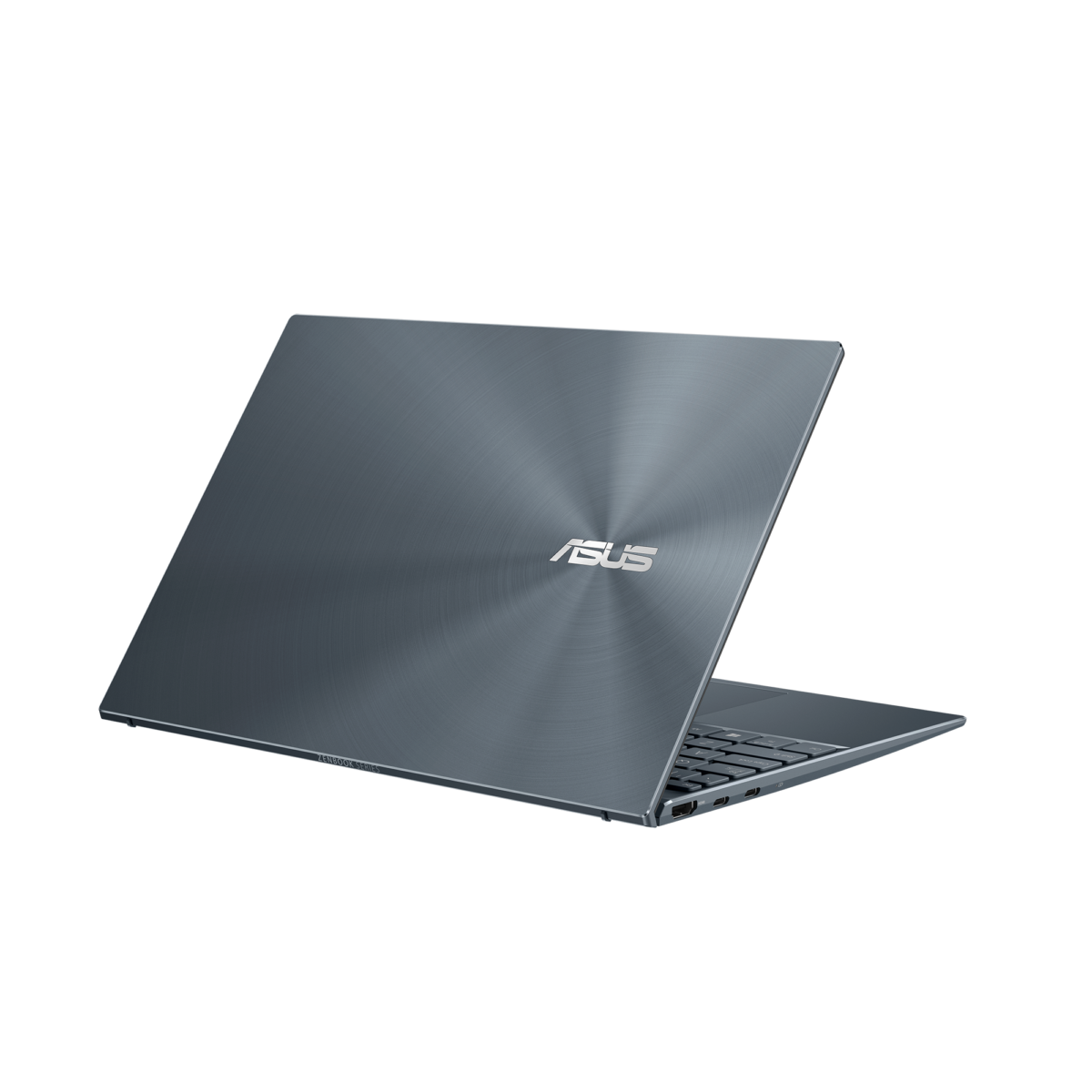
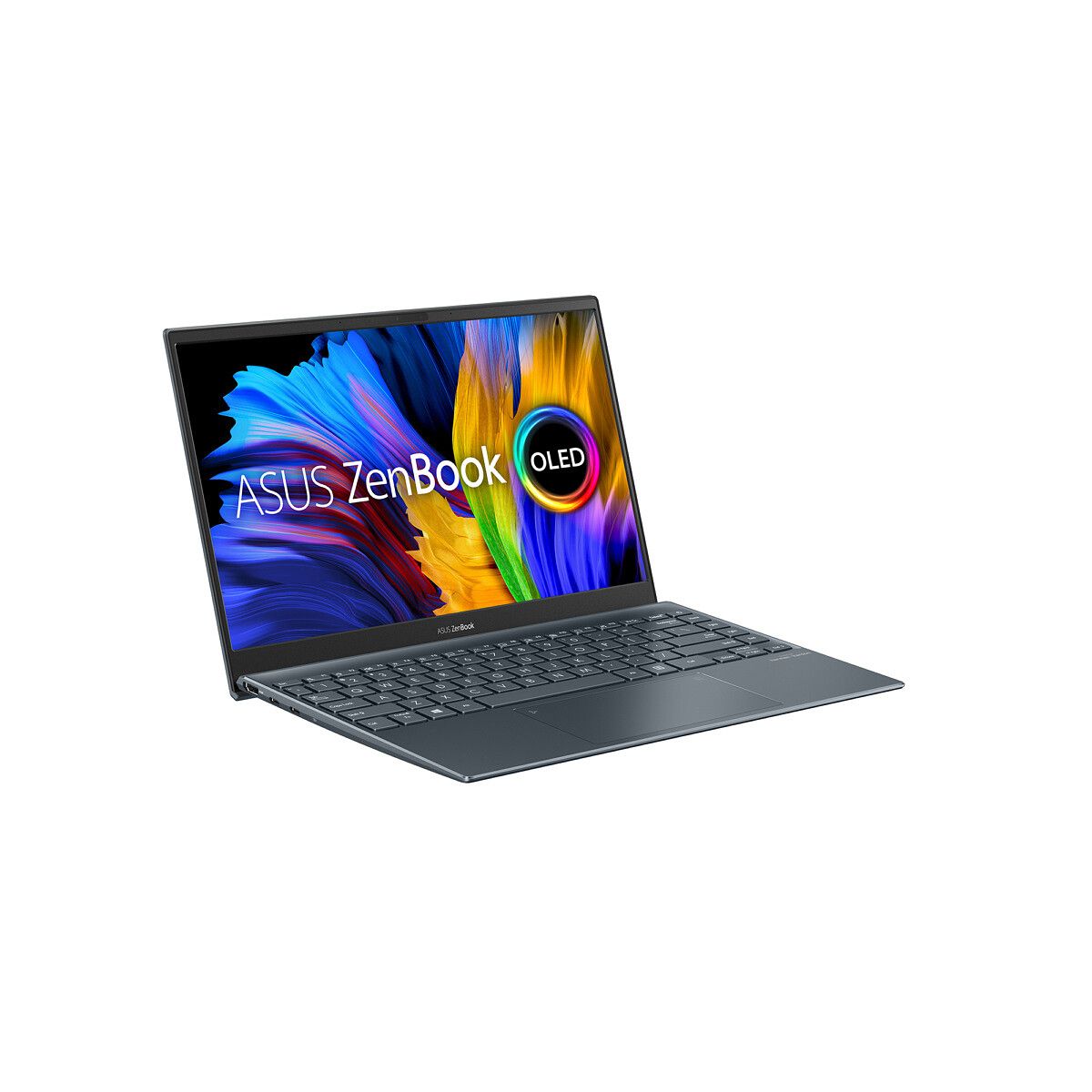
ASUS ZenBook 13 OLED product image ASUS ZenBook 13 OLED product image

The new ZenBook 13 is one of the lightest laptops weighing just 1.1kgs, and it comes with an OLED display. It will be offered with either the Ryzen 7 5700U or the Ryzen 5 5500U processor. Meanwhile, the OLED panel comes with a full-HD resolution, 100% coverage of DCI-P3 color gamut, 400-nits max brightness, VESA DisplayHDR 500, and is Pantone Validated. ASUS claims that the ZenBook 13 can offer a battery life of up to 16-hours using its 67Whr battery. Notably, the notebook doesn’t come with a standard 3.5mm audio jack, so you’ll need to rely on USB Type-C for audio. This is similar to what we saw on the ZenBook Flip S.

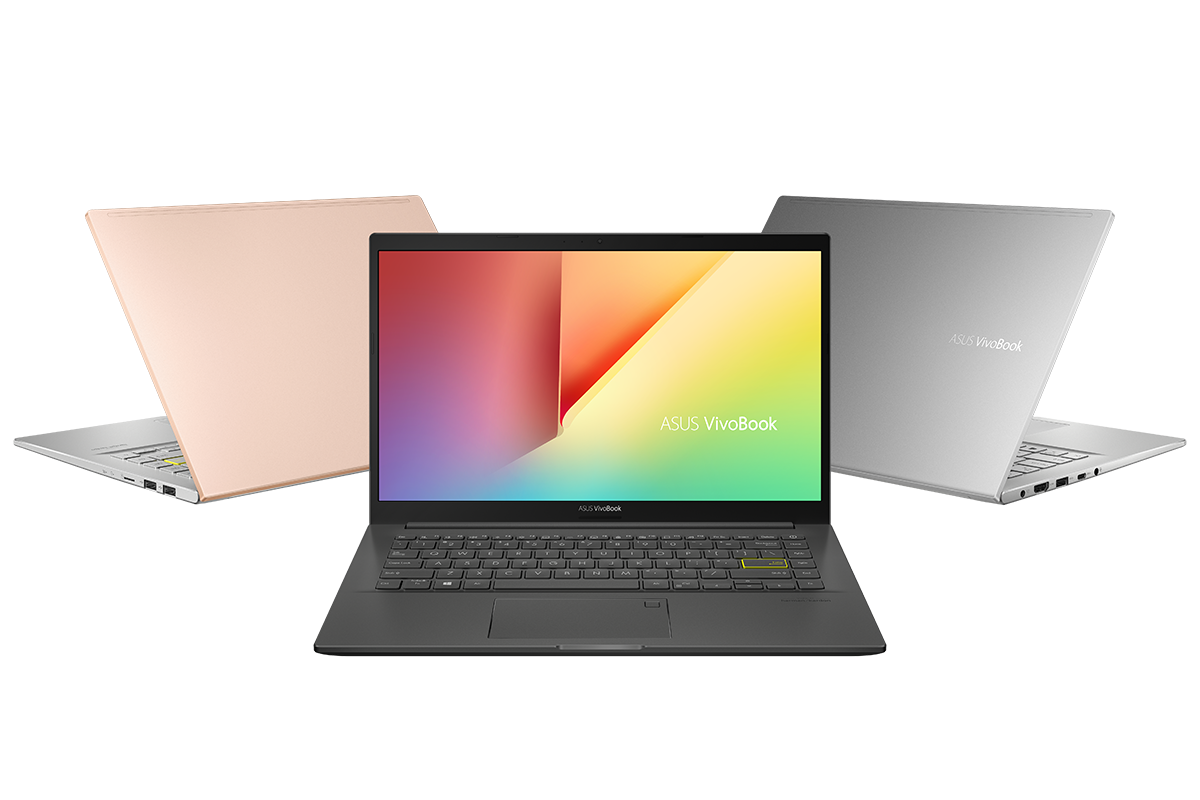
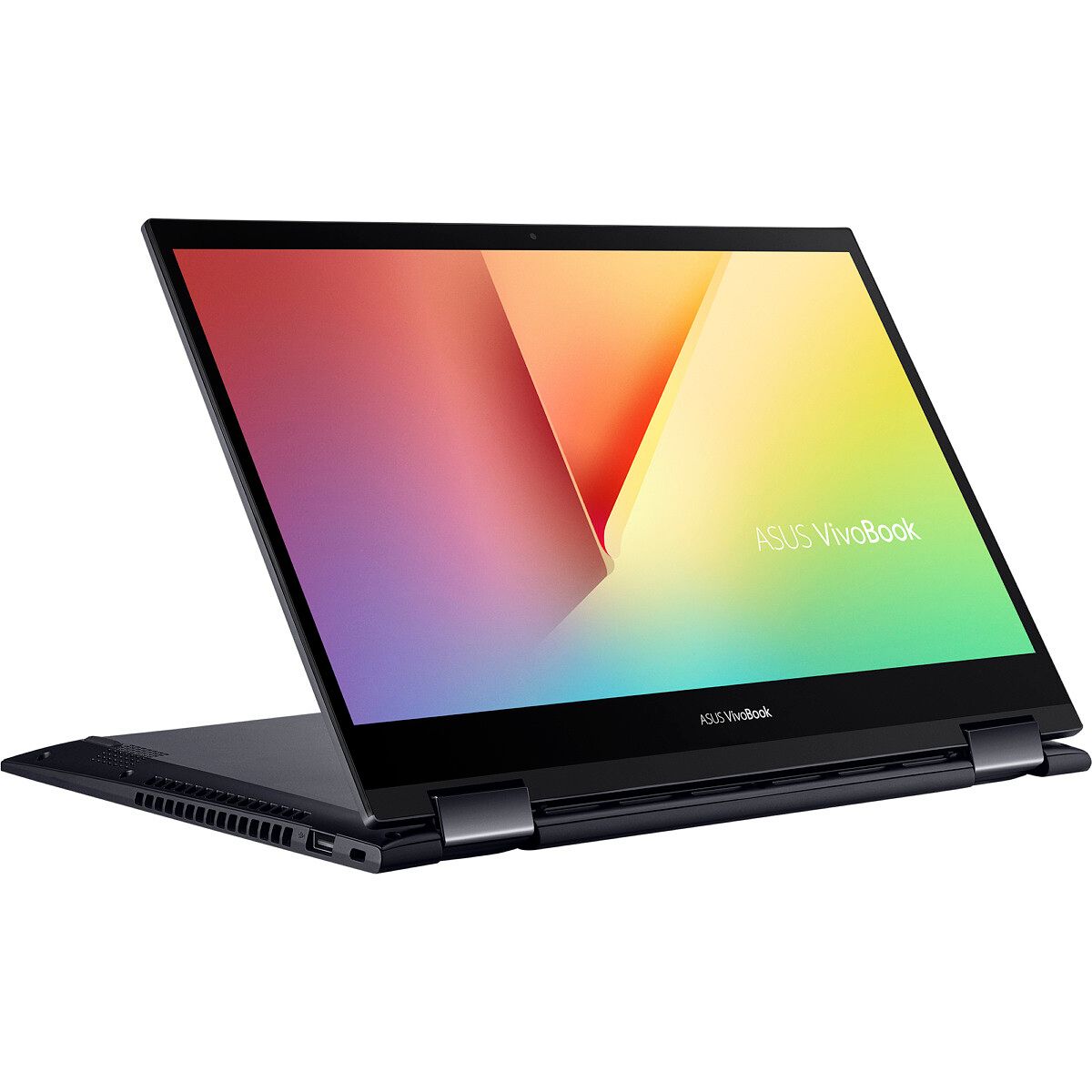
ASUS VivoBook K14 AMD ASUS VivoBook Flip 14 AMD ASUS VivoBook S14 AMD ASUS VivoBook 15 AMD

Moving to the VivoBook series, the VivoBook S S14 will only be offered with the AMD Ryzen 5 5500U that comes with integrated AMD Radeon RX Vega 7 graphics, up to 8GB of RAM, and 1TB M.2 SSD with the provision of a secondary M.2 SSD drive.

The VivoBook Ultra K14/K15, as its name suggests, will be offered in 14-inch and 15-inch sizes, and both will be available with either the Ryzen 5 5500U or the Ryzen 7 5700U processors. These also come with up to 8GB of RAM and 512GB M.2 SSD with the option of a secondary SATA HDD.

Next is the VivoBook Flip 14, which is also available with either the Ryzen 5 5500U or the Ryzen 7 5700U processors, along with the lower-end Ryzen 3 5300U. ASUS claims that the 14-inch NanoEdge display has slim bezels, and overall, the laptop has a footprint that is similar to a 13-inch laptop. The touchscreen on the VivoBook Flip 14 also supports the ASUS Pen stylus, while the pen holder can stick onto the lid of the laptop.

Lastly, we have the VivoBook 15 and VivoBook 17 which offer similar features in different sizes. The 17-inch model notably comes with a bigger battery and more RAM.

All the new laptops will be available via offline stores across India except for the VivoBook 17 which will be available both offline and online via Flipkart.

Model Price
ZenBook 13 OLED (UM325UA) ₹79,990
VivoBook S S14 (M433) ₹65,990
VivoBook Ultra K14/K15 ₹58,990
VivoBook Flip 14 (TM420) ₹59,990
VivoBook 15 (M515) ₹54,990
VivoBook 17 (M712) ₹62,990

The post ASUS launches the ZenBook 13 OLED and VivoBook range with AMD Ryzen 5000U CPUs in India appeared first on xda-developers.


from xda-developers https://ift.tt/3cD8wS9
via IFTTT

ARM launches the ARMv9 architecture with SVE2 and new security features

Earlier today as part of its Vision Day event, ARM disclosed some details about its new ARMv9 architecture, which the company expects will be used in over 300 billion chips this decade.

The last major revision to ARM’s ISA was v8, which was introduced in October of 2011 with the 64-bit AArch64 instruction set. However, ARM has extended ARMv8 over the years with new features such as Memory Tagging in ARMv8.5. With ARMv9, the company is continuing to use AArch64 as the baseline instruction set but has extended it with new features aimed to improve security and performance.

According to ARM, here are the major new features of the ARMv9-A architecture:

  • SVE2: extending the benefit of scalable vectors to many more use cases
  • Realm Management Extension (RME): extending Confidential Compute on Arm platforms to all developers.
  • BRBE: providing profiling information, such as Auto FDO
  • Embedded Trace Extension (ETE) and Trace Buffer Extension (TRBE): enhanced trace capabilities for Armv9
  • TME: hardware transactional memory support for the Arm architecture
ARMv9 features

Source: ARM. Via: AnandTech.

For a deeper dive into the high-level changes coming with ARMv9, I recommend reading Andrei Frumusanu’s reporting over at AnandTech, but I’ll be providing a summary of the key changes that you should be aware of.

NEON succeeded by SVE2

NEON is an advanced single instruction multiple data (SIMD) architecture extension. SIMD here refers to a single instruction operating on multiple data items in parallel. These data items are organized into registers that hold vectors of bits.

Scalable Vector Extensions, or SVE, is an extension to ARMv8.2 or later that extends the vector processing capability of AArch64 to address the computing requirements of high performance computing (HPC) tasks and machine learning. Importantly, it also allows for vector register lengths between 128 to 2048 bits. From a software development standpoint, the benefit of a variable vector register length is that code only needs to be compiled once to take full advantage of future CPUs with longer vector registers. Similarly, that code can also be run on CPUs with fewer SIMD execution pipelines, such as those in IoT devices.

As SVE was aimed more at HPC workloads and was also not as versatile an instruction set as NEON, ARM introduced SVE2 in early 2019 to address these issues. SVE2 added new instructions targeting DSP workloads that still rely on NEON. Now with ARMv9, SVE2 is succeeding NEON as a baseline feature of ARMv9 CPUs.

Machine learning improvements

ARM sees machine learning workloads becoming more and more popular in the next decade, which is why previous revisions to ARMv8 introduced new matrix multiplication instructions. These will be baseline features of ARMv9 CPUs, enabling smaller scope ML workloads to run directly on the CPU rather than dedicated accelerators. Obviously, running ML workloads on dedicated accelerators is desired when one prefers fast performance or power efficiency, but it is not always possible to do so on all hardware.

Source: ARM. Via: AnandTech.

ARMv9’s Confidential Compute Architecture

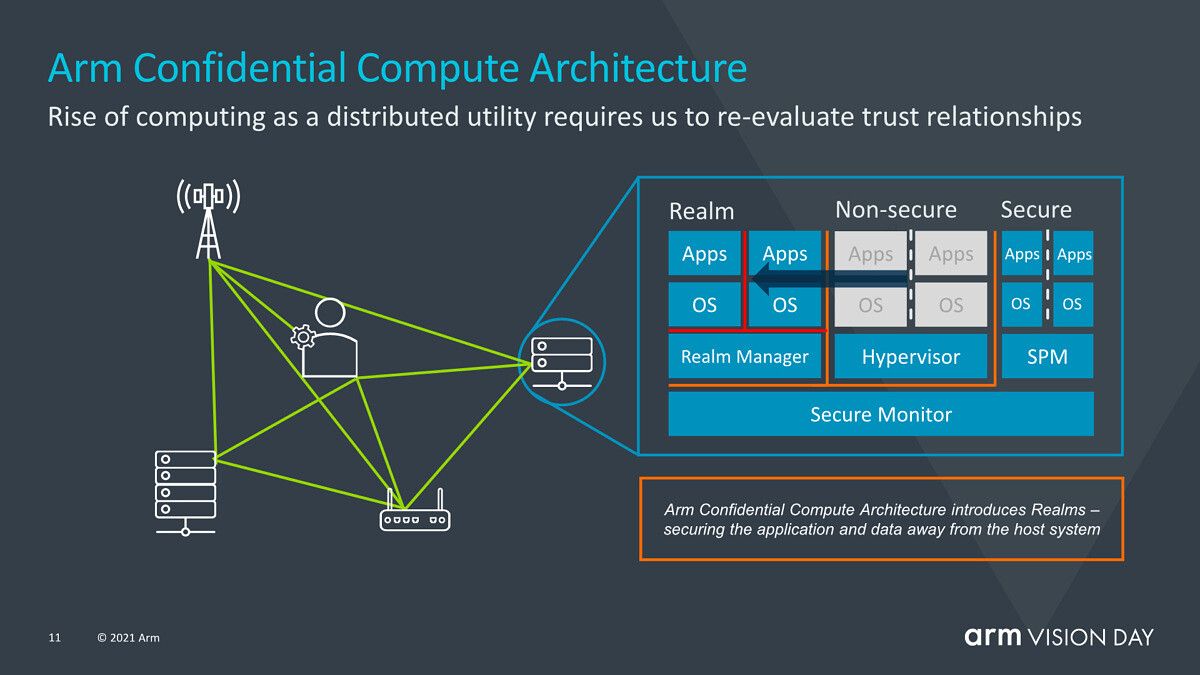
In an effort to improve security, ARMv9 introduces a new Confidential Compute Architecture (CCA). As AnandTech explains, ARM’s CCA is a shift away from the current software stack situation wherein secure applications running on a device have to trust the OS and hypervisor they’re running on. The current model of security is built upon the fact that more privileged tiers of software can monitor the execution of less privileged software tiers, which can be problematic when the OS or hypervisor are compromised.

How CCA fixes this problem is by dynamically creating “realms”, which are secure, containerized execution environments that are opaque to the OS or hypervisor. Apps within “realms” can attest their trustworthiness to a “realm manager”, code that’s a fraction of the size of a hypervisor, which is now solely responsible for resource allocation and scheduling. The benefit of using “realms” is that the chain of trust is reduced, allowing for secure applications to be run on any device regardless of the underlying OS which will be transparent to security issues.

Source: ARM. Via: AnandTech.

According to AnandTech, ARM didn’t detail exactly how “realms” are separated from the OS and hypervisor, but they speculate that this separation stems from hardware-backed address spaces that can’t interact with each other.

Future ARM CPU and GPU designs

Although it isn’t directly related to ARMv9, ARM shared its projected performance expectations for future v9-based CPU designs. Over the next two generations of mobile IP core designs, ARM expects an aggregate of 30% gains in IPC performance. That means the actual generational increase in performance amounts to around 14%, as AnandTech explains. Clearly, the rate of improvement has slowed down somewhat compared to previous years.

We’ve seen how CPU implementations by companies like Qualcomm, Samsung, and Huawei don’t reach the expected performance projections of new ARM core designs, a fact that ARM points out in a slide that details how CPU performance can be improved by improving the memory path, caches, or frequencies.

Source: ARM. Via: AnandTech.

Still, ARMv9 promises to bring welcome improvements to performance, security, and machine learning when new CPUs based on the ISA ship in commercial devices in early 2022.

As for future Mali GPUs, ARM has disclosed that it is working on technologies such as variable rate shading (VRS) and ray tracing. These features have become popular among high-end PC GPU hardware and the ninth-generation of video game consoles such as Sony’s PlayStation 5 and Microsoft’s Xbox Series X/S.

Source: ARM. Via: AnandTech.

Featured image credits: ARM via AnandTech

The post ARM launches the ARMv9 architecture with SVE2 and new security features appeared first on xda-developers.


from xda-developers https://ift.tt/2QKm59O
via IFTTT